Understanding the Working Principles of a Desktop Computer CPU
Introduction
The Central Processing Unit (CPU) is often referred to as the “brain” of the computer. It is responsible for executing instructions, performing calculations, and managing data flow within the system. For anyone who is either a hobbyist building a custom PC or an individual who just wants to understand how a computer works, understanding the CPU’s working principles and core parameters will help them make informed decisions when selecting hardware components.
This article will discuss the basic operational principles of the CPU, describe the main parameters of the current generation of desktop processors, and present examples to demonstrate their operation.
1. The Fundamental Working Principles of a CPU
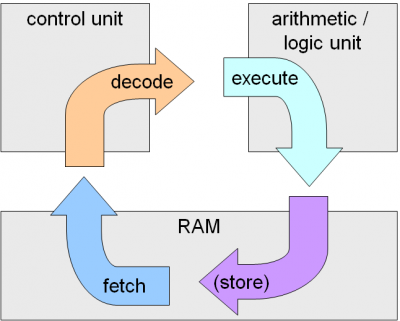
The CPU processes data and executes instructions through a cycle called the Fetch-Decode-Execute Cycle:
- Fetch: The CPU reads an instruction from memory (RAM) using the instruction pointer.
- Decode: The instruction is decoded by the instruction decoder to determine the required operation.
- Execute: The CPU performs the necessary calculations or operations using the Arithmetic Logic Unit (ALU) and stores the result in registers or memory.
- Writeback(Store):The CPU stores the result of the operation back into memory or a register (a small, fast storage location within the CPU).
These steps are repeated billions of times per second, allowing computers to perform complex tasks efficiently.
Fetch-Decode-Execute Cycle Diagram:
2. Key Components of a CPU
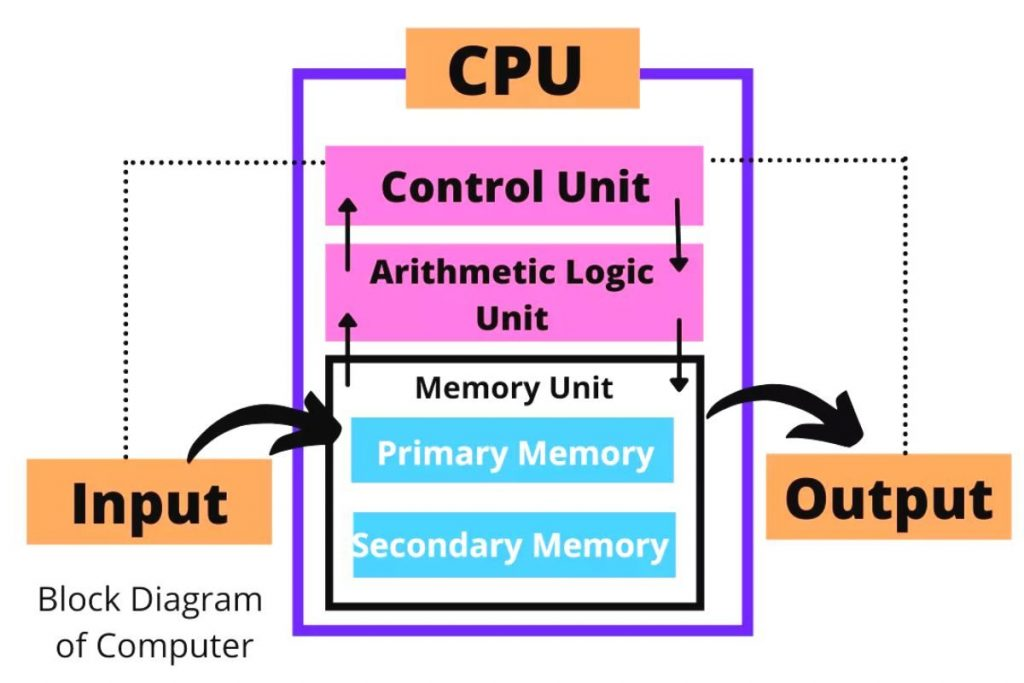
Modern CPUs consist of several essential components that enable them to process data effectively:
- Control Unit (CU): Directs the operation of the processor by interpreting instructions and coordinating data flow.
- Arithmetic Logic Unit (ALU): Performs mathematical calculations and logical operations.
- Registers: Small storage locations within the CPU that hold data for quick access.
- Cache Memory: A small amount of high-speed memory that stores frequently used instructions and data.
3. Core Parameters of Modern Desktop CPUs
When choosing a CPU for a desktop computer, several key specifications should be considered:
3.1 Number of Cores and Threads
- Meaning: A core is an individual processing unit within a CPU, capable of executing tasks independently. Threads represent the ability of each core to handle multiple tasks simultaneously.
- Example: The Intel Core i9-13900K has 24 cores and 32 threads, while the AMD Ryzen 9 7950X has 16 cores and 32 threads. Impact: More cores and threads enable better multitasking and performance in applications like video editing and gaming.
- Impact: More cores and threads enable better multitasking and performance in applications like video editing and gaming.
3.2 Clock Speed and Turbo Boost
- Meaning: The clock speed (in GHz) determines how many cycles a CPU can execute per second. Turbo Boost is a dynamic feature that increases clock speed when extra performance is needed.
- Example: The AMD Ryzen 7 7800X has a base clock speed of 4.5 GHz and a boost clock of 5.4 GHz.
- Impact: Higher clock speeds result in faster task execution but also generate more heat and consume more power.
3.3 Cache Size (L1, L2, L3)
- Meaning: Cache memory is a high-speed memory storage located inside the CPU that helps reduce data access time.
- Example: The Intel Core i7-13700K has 24MB of L3 cache.
- Impact: Larger cache sizes reduce data retrieval times, improving overall processing efficiency.
- Purpose of L1, L2, and L3 Cache:
- L1 Cache: The smallest and fastest cache, located closest to the CPU cores. It stores the most frequently accessed data and instructions.
- L2 Cache: Larger than L1 but slightly slower. It acts as a secondary buffer, holding data that does not fit in L1 cache.
- L3 Cache: The largest but slowest of the three caches. It is shared among multiple cores and helps reduce latency when accessing main memory.
- Significance: The tiered cache structure ensures that the CPU retrieves data as quickly as possible, improving overall performance. Without these layers, the CPU would have to access slower RAM frequently, causing performance bottlenecks.
4. Conclusion
The process of selecting appropriate computer components requires knowledge of CPU functions together with essential specifications for computer building or purchase decisions. Your CPU requirements determine which processor you should select for gaming or professional workloads or general computing needs. System optimization depends on analyzing core specifications and clock speed alongside cache size and power efficiency.
Key Takeaways:
- The CPU functions through the Fetch-Decode-Execute Cycle to process data.
- Cores and threads: The number of cores together with thread capabilities defines how many tasks a CPU can process simultaneously.
- Clock speed and Turbo Boost: The combination of clock speed and Turbo Boost technology determines processing speed.
- Cache memory (L1, L2, L3): Data access times become faster and system efficiency improves through the use of cache memory (L1, L2, L3).
- Choosing the right CPU: Your CPU selection must match the requirements of your specific computing needs.
A comprehensive knowledge of CPUs will guide both beginners and experienced PC builders through the evolving computer hardware industry with assurance.